Home security cameras with night vision A Brighter Look at Securing Your Home

Home security cameras with night vision

Dive into the world of home security cameras with night vision, where safety meets innovation and protection is just a click away. Uncover the secrets behind these cutting-edge devices and how they illuminate the path to a secure home environment.

Explore the ins and outs of different camera types, installation tips, smart home integration, and more as we embark on this enlightening journey together.

Overview of Home Security Cameras with Night Vision

Having home security cameras with night vision is crucial for ensuring round-the-clock surveillance of your property and loved ones. These cameras provide enhanced security and peace of mind, especially during nighttime hours when visibility is limited.

Importance of Night Vision Technology

Night vision technology in security cameras allows them to capture clear footage in low-light or no-light conditions. This is achieved through the use of infrared LEDs that illuminate the area with invisible light, which is then picked up by the camera’s sensor to produce a visible image.

Popular Brands Offering Home Security Cameras with Night Vision

  • 1. Arlo: Arlo offers a range of wire-free security cameras with night vision capabilities, providing high-definition video quality even in the dark.
  • 2. Nest: Nest Cam Outdoor and Indoor cameras are equipped with night vision technology, offering 24/7 surveillance with clear footage.
  • 3. Ring: Ring’s lineup of security cameras, such as the Ring Stick Up Cam, feature night vision for enhanced visibility during nighttime.

Types of Home Security Cameras with Night Vision

Home security cameras with night vision

When it comes to home security cameras with night vision, there are several types to choose from, each with its own unique features and benefits. Let’s explore the different types and their suitability for various home setups.

Indoor Security Cameras

Indoor security cameras with night vision are designed to monitor the inside of your home. They are ideal for keeping an eye on your living room, nursery, or other indoor spaces. These cameras are usually compact and discreet, blending seamlessly into your home decor.

  • Features: High-definition video quality, motion detection, two-way audio communication.
  • Suitability: Best for monitoring indoor spaces such as living rooms, bedrooms, or nurseries.
  • Benefits: Provides peace of mind by allowing you to check on your home while you are away, captures clear footage in low-light conditions.

Outdoor Security Cameras

Outdoor security cameras with night vision are designed to withstand outdoor elements such as rain, wind, and snow. These cameras are ideal for monitoring the exterior of your home, including your driveway, backyard, or front porch.

  • Features: Weatherproof design, infrared night vision, wide-angle lens.
  • Suitability: Best for monitoring outdoor areas, deterring intruders, and capturing clear footage in low-light conditions.
  • Benefits: Enhances home security by providing a visual deterrent to potential intruders, allows you to monitor your property around the clock.

Wireless Security Cameras

Wireless security cameras with night vision offer flexibility and ease of installation. These cameras connect to your home Wi-Fi network, allowing you to monitor your home remotely from your smartphone or tablet.

  • Features: Remote viewing, cloud storage, easy installation.
  • Suitability: Best for homeowners who want a DIY security solution without the need for extensive wiring.
  • Benefits: Easy to install and set up, provides remote access to live footage, works well in low-light conditions.

Installation and Placement Tips

When it comes to installing home security cameras with night vision, proper placement is key to maximizing their effectiveness. Here are some step-by-step tips for installation and optimal placement to enhance night vision capabilities while avoiding common mistakes.

Step-by-Step Installation Guide

  • Start by choosing the right location for your camera, ensuring it covers the most vulnerable areas of your property.
  • Mount the camera at least 7-10 feet above the ground for the best angle and coverage.
  • Securely fix the camera using the appropriate mounting hardware to prevent it from moving or being tampered with.
  • Connect the camera to a power source and ensure it is properly powered before testing its night vision capabilities.
  • Adjust the camera settings to optimize night vision mode for clear footage in low-light conditions.

Optimal Placement Tips for Night Vision

  • Position cameras away from direct light sources to prevent glare and ensure clear night vision footage.
  • Angle cameras towards entry points such as doors and windows for maximum coverage of potential intruders.
  • Avoid placing cameras in areas with obstructions like trees or bushes that could block the night vision capabilities.
  • Consider installing additional lighting around the camera to enhance night vision quality in dark areas.

Common Mistakes to Avoid during Installation

  • Avoid installing cameras in hidden or hard-to-reach areas that may obstruct the view or make maintenance difficult.
  • Do not place cameras facing direct sunlight or bright lights, as this can impact the night vision performance.
  • Ensure cameras are securely mounted to prevent tampering or theft, especially in vulnerable locations.
  • Regularly check and clean camera lenses to maintain clear night vision footage and prevent distortion.

Integration with Smart Home Systems
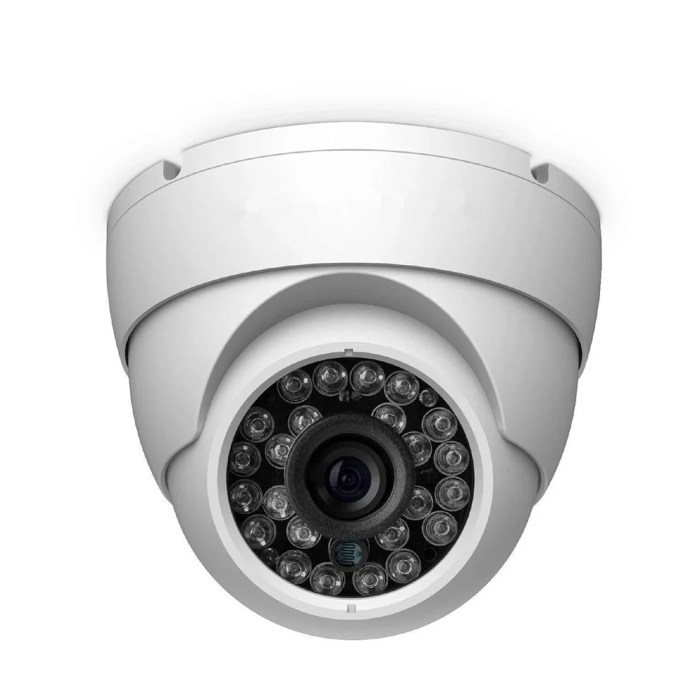
Cctv monitoring 1080p ahd

Home security cameras with night vision can be seamlessly integrated with smart home systems, allowing for a more advanced and convenient security monitoring experience.

Advantages of Connecting Cameras to Smart Devices

  • Remote Access: By connecting your security cameras to smart devices, you can monitor your home from anywhere in the world using a smartphone or tablet.
  • Real-Time Alerts: Receive instant notifications on your smart devices when motion is detected or any unusual activity is captured by the cameras.
  • Integration with Other Smart Devices: You can create automation routines where the cameras work in conjunction with other smart devices like lights or alarms for a comprehensive security system.
  • Enhanced Security: Smart home integration allows for a more proactive approach to security, giving you the ability to respond quickly to any potential threats.

Examples of Automation Enhancing Home Security Monitoring

  • Automatic Lighting: Set up a routine where the security cameras trigger the outdoor lights to turn on when motion is detected, deterring intruders.
  • Lock Integration: Connect your cameras with smart locks to automatically lock doors when suspicious activity is detected, ensuring the safety of your home.
  • Voice Control: Use voice commands to view camera feeds on smart displays or TVs, providing a hands-free way to monitor your home.

Maintenance and Troubleshooting

When it comes to maintaining and troubleshooting your home security cameras with night vision, there are a few key tasks and tips to keep in mind to ensure optimal performance and security.Regular maintenance is crucial to ensure that your cameras are functioning properly and providing the level of security you need. Here are some maintenance tasks you should perform:

Maintenance Tasks

  • Regularly clean the camera lenses to remove dust and dirt that can affect image quality.
  • Check for any loose connections or cables that may impact the camera’s functionality.
  • Ensure that the camera is securely mounted and properly positioned for optimal coverage.
  • Inspect the camera housing for any signs of damage or wear and tear.
  • Update the camera firmware regularly to access the latest features and security enhancements.

Troubleshooting Tips

  • If you are experiencing issues with night vision, check the infrared LEDs on the camera to ensure they are working properly.
  • Verify that the camera is receiving power and that the cables are connected securely.
  • Restart the camera or the entire system to see if that resolves any issues.
  • Check the camera settings to make sure they are configured correctly for your needs.
  • If you are still experiencing problems, consult the camera’s user manual or contact technical support for assistance.

Regular checks and updates are essential to prevent malfunctions and ensure that your home security cameras are operating at their best. By staying on top of maintenance tasks and troubleshooting any issues promptly, you can maintain a high level of security for your home.

Cost Considerations and Budgeting

When it comes to purchasing and installing home security cameras with night vision, cost is a significant factor to consider. It’s important to find a balance between quality and affordability to ensure the safety of your home without breaking the bank.

Factors Affecting Cost

  • Resolution: Higher resolution cameras generally come with a higher price tag.
  • Number of Cameras: The more cameras you need, the higher the overall cost.
  • Brand and Features: Different brands offer various features that can impact the cost.
  • Storage Options: Cameras with more extensive storage capabilities may cost more upfront.

Tips for Budgeting

  • Set a budget before starting your search to help narrow down options.
  • Look for package deals or discounts when purchasing multiple cameras.
  • Consider refurbished or older models to save money without sacrificing quality.
  • Shop around and compare prices from different retailers before making a decision.

Comparison of Prices

Camera Model Price Range
Brand X HD Camera $100-$200
Brand Y 4K Camera $300-$500
Brand Z Outdoor Camera $150-$250

Privacy and Legal Considerations

When it comes to using home security cameras with night vision, it is crucial to consider privacy and legal aspects to ensure that you are not infringing on anyone’s rights. By understanding the regulations and best practices, you can strike a balance between security and privacy.

Privacy Concerns

  • Ensure that your cameras are positioned in a way that only captures your property and does not invade your neighbors’ privacy.
  • Consider using features like motion detection to only record when there is activity, reducing unnecessary recording of empty spaces.
  • Secure your camera feeds with strong passwords and encryption to prevent unauthorized access.

Legal Regulations

  • Research and understand the recording laws in your area to ensure that you are compliant with any regulations regarding audio and video recording.
  • Be aware of data protection laws and regulations to safeguard any footage captured by your security cameras.
  • If you are using your cameras for surveillance outside your property, inform visitors and passersby with visible signs to respect their privacy.

Best Practices

  • Regularly review and delete old footage to prevent unauthorized use or access to sensitive information.
  • Consider using cloud storage with secure encryption to store your camera footage safely.
  • Keep your cameras well-maintained and up to date with the latest security patches to prevent hacking or unauthorized access.

Real-Life Applications and Success Stories

Home security cameras with night vision have proven to be invaluable in safeguarding properties and providing peace of mind to homeowners. Here are some real-life examples of how these cameras have made a difference:

Prevention of Intrusions and Crimes

  • A homeowner in a suburban neighborhood installed a night vision security camera outside their house. One night, the camera captured footage of a potential intruder attempting to break in. The homeowner received a notification on their smartphone and promptly contacted the authorities. Thanks to the clear video evidence, the intruder was apprehended before any harm was done.
  • In another instance, a family on vacation received an alert from their home security system showing suspicious activity in their backyard. The night vision camera revealed a group of individuals attempting to access the property. The family was able to contact their neighbors and the police, preventing a possible burglary.

Protection of Homes and Families

  • One family shared their experience of a break-in that was deterred by their home security cameras with night vision. The would-be burglar was caught on camera attempting to enter the house but fled upon realizing they were being recorded. The family credited the cameras for protecting their home and loved ones.
  • A single mother living in a high-crime area installed night vision cameras around her property. One night, the cameras captured footage of someone lurking outside her house. The police were able to identify the individual and take preventive measures, ensuring the safety of the family.

User Testimonials and Reviews

  • “I never thought I would need security cameras until I installed one with night vision. The peace of mind it gives me, especially when I’m away from home, is priceless.”
    -Sarah, homeowner
  • “Our security cameras detected motion outside our house at night, and we were able to see that it was just a stray animal. Still, it was reassuring to know that our home was being monitored.”
    -Mark, user

Last Recap

As we wrap up our exploration of home security cameras with night vision, remember that safety never sleeps. Stay vigilant, stay informed, and let technology be your trusted ally in safeguarding what matters most.

User Queries

How far can night vision cameras see?

Night vision cameras can typically see up to 100 feet in complete darkness, depending on the model and technology used.

Do all home security cameras come with night vision?

No, not all home security cameras come with night vision. It’s essential to specifically look for this feature when purchasing a camera for low-light conditions.

Can night vision cameras be used outdoors?

Yes, there are outdoor-specific night vision cameras designed to withstand various weather conditions while providing clear surveillance footage even in the dark.

Smart door locks for home security Enhancing Safety and Convenience

Aquara n100 priceboon

Step into the world of smart door locks for home security where modern technology meets traditional safety measures, creating a seamless blend of innovation and protection. From keyless entry to remote monitoring, explore the future of safeguarding your home with cutting-edge solutions.

Discover the different types of smart door locks, their installation process, integration with smart home systems, security features, cost considerations, and future trends that are revolutionizing the way we approach home security.

Introduction to Smart Door Locks

Smart door locks are innovative security devices that provide a convenient and efficient way to secure your home. These locks can be controlled remotely through a smartphone or a key fob, eliminating the need for traditional keys.

Benefits of Using Smart Door Locks for Home Security

  • Convenience: Smart door locks allow you to lock and unlock your door from anywhere, providing ease of access for family members and trusted individuals.
  • Enhanced Security: With features like keyless entry, alarm systems, and real-time monitoring, smart door locks offer advanced security measures to protect your home.
  • Integration with Smart Home Systems: Smart door locks can be integrated with other smart home devices, allowing for a seamless and interconnected home security system.
  • Audit Trail: Some smart door locks offer an audit trail feature, which allows you to track who enters and exits your home, providing added security and peace of mind.

Revolutionizing Traditional Locking Systems

Smart door locks have revolutionized traditional locking systems by providing a more secure, convenient, and technologically advanced solution for home security. With the ability to control access remotely, monitor activity, and integrate with other smart devices, smart door locks have become an essential component of modern home security systems.

Types of Smart Door Locks

When it comes to smart door locks, there are several types available in the market, each offering unique features and benefits to enhance home security.

Keyless Entry Smart Locks

Keyless entry smart locks are designed to provide convenience and security by allowing users to unlock their doors without the need for traditional keys. Instead, these locks can be operated using a keypad, touchscreen, or even a smartphone app. Some keyless entry smart locks also offer additional features such as remote access and integration with smart home systems.

Wi-Fi Enabled vs. Bluetooth-Enabled Smart Locks

Wi-Fi enabled smart locks connect to your home’s Wi-Fi network, allowing you to control and monitor your lock from anywhere using a smartphone app. These locks offer greater flexibility and convenience, but they may consume more power and require a stable internet connection. On the other hand, Bluetooth-enabled smart locks use Bluetooth technology to communicate with your smartphone within a limited range.

While they may not offer the same remote access capabilities as Wi-Fi enabled locks, Bluetooth-enabled locks are often more energy-efficient and can provide a secure connection without relying on the internet.

Installation and Setup

Installing a smart door lock is a great way to enhance the security of your home. Follow these steps to set up your smart door lock and ensure it functions properly.

Step-by-Step Guide

  • Start by removing your existing door lock and deadbolt.
  • Read the manufacturer’s instructions carefully to understand the installation process.
  • Install the new smart door lock according to the provided guidelines, making sure it fits securely in place.
  • Connect the smart lock to your home’s Wi-Fi network or smart home hub, if required.
  • Test the lock to ensure it operates smoothly and integrates with your smartphone or other devices.

Tools Required

  • Screwdriver
  • Tape measure
  • Drill (if necessary for installation)
  • Smartphone or tablet for setup

Tips for Troubleshooting

  • If the lock isn’t connecting to your Wi-Fi network, try resetting the lock and reconfiguring the settings.
  • Make sure the batteries are properly inserted and have enough power to operate the smart lock.
  • Check for any obstructions in the door frame that may be preventing the lock from functioning correctly.
  • Contact customer support for the smart lock manufacturer if you encounter persistent issues during installation.

Integration with Smart Home Systems

Smart door locks can be seamlessly integrated into a smart home ecosystem, allowing homeowners to control access to their property remotely and efficiently. This integration enhances overall home security and convenience by providing users with the ability to monitor and manage their door locks from anywhere.

Compatibility with Virtual Assistants

Smart door locks are often compatible with popular virtual assistants like Alexa and Google Assistant. This compatibility allows users to lock and unlock their doors using voice commands, as well as integrate their door locks into routines or automation sequences set up through these virtual assistants.

  • Users can simply ask Alexa or Google Assistant to lock or unlock their doors, providing a hands-free and convenient way to control access to their homes.
  • Integration with virtual assistants also enables users to check the status of their door locks remotely, ensuring peace of mind and added security.
  • By incorporating smart door locks into their smart home systems, users can create custom routines that involve locking or unlocking doors at specific times or in response to certain triggers, enhancing overall home automation.

Enhancing Home Automation

Smart door locks play a key role in enhancing overall home automation by seamlessly integrating with other smart devices and systems within the home.

  • Users can set up automated routines that involve their smart door locks, such as automatically unlocking the door when a specific person arrives home or locking the door at a certain time every night.
  • Integration with smart home systems allows for increased customization and control over home security, providing users with a comprehensive and interconnected approach to managing their living space.
  • Smart door locks can also be integrated with security cameras, motion sensors, and other smart devices to create a robust home security ecosystem that works together seamlessly to keep the home safe and secure.

Security Features and Concerns

Shopee lock smart door card password security electronic way ph fingerprint philippines video

Smart door locks come with a variety of security features to ensure the safety of your home and loved ones. These features include:

Encryption Protocols

Smart door locks use advanced encryption protocols to protect the data transmitted between the lock and your smartphone. This ensures that unauthorized individuals cannot intercept or manipulate the communication, adding an extra layer of security to your home.

Remote Locking and Monitoring

Many smart door locks allow you to remotely lock or unlock your door using a smartphone app. This feature not only provides convenience but also allows you to monitor the status of your door from anywhere, giving you peace of mind when away from home.

Access Control

Smart door locks offer customizable access control options, allowing you to create unique access codes for different users. This feature enables you to grant temporary access to guests or service providers without compromising the security of your home.

Security Alerts

Some smart door locks are equipped with security alert capabilities, sending notifications to your smartphone in case of any unauthorized entry attempts or suspicious activities. This real-time monitoring helps you stay informed and take immediate action in case of a security breach.

Common Security Concerns

Despite the advanced security features, there are still some common concerns related to smart door locks, such as:

  • Potential hacking vulnerabilities
  • Reliance on internet connectivity
  • Power outages affecting lock operation

It is essential to regularly update the firmware of your smart door lock and use strong, unique passwords to mitigate these security risks.

Remote Access and Monitoring

Aquara n100 priceboon

In today’s digital age, remote access and monitoring are crucial features of smart door locks that provide convenience and enhance home security.

How Remote Access Works

  • Smart door locks can be connected to your smartphone or other devices through a dedicated app or a smart home system.
  • Using the app, you can lock or unlock your door from anywhere, as long as you have an internet connection.
  • Remote access allows you to grant access to visitors or service providers even when you are not at home.

Benefits of Monitoring Access

  • Being able to monitor who enters and exits your home in real-time provides peace of mind and enhances security.
  • You can receive notifications when someone unlocks the door, allowing you to keep track of activity and identify any suspicious behavior.
  • Monitoring access also helps you keep tabs on family members or caregivers entering and leaving the house.

Notifications and Alerts for Enhanced Security

  • Smart door locks can send instant notifications to your smartphone when the door is accessed, providing an added layer of security.
  • Alerts can help you respond quickly to any unauthorized entry attempts or potential security breaches.
  • You can customize notifications based on specific events, such as failed entry attempts or low battery alerts.

Cost Considerations

When considering smart door locks for your home, it’s important to factor in the costs associated with purchasing and installing these devices. While smart door locks can offer added security and convenience, they also come with a price tag that varies depending on the model and features you choose.

Breakdown of Costs

  • Purchase Price: The cost of smart door locks can range from $100 to $300 or more, depending on the brand, features, and technology.
  • Installation: Professional installation may incur an additional cost of $100 to $200, or you can choose to install it yourself if you’re comfortable with DIY projects.
  • Additional Accessories: Some smart door locks may require additional accessories or hubs for full functionality, which can add to the overall cost.

Comparison of Price Range

Smart Door Lock Model Price Range
August Smart Lock Pro $200 – $250
Yale Assure Lock SL $150 – $200
Schlage Encode Smart WiFi Deadbolt $250 – $300

Long-Term Cost Savings

  • Security: Smart door locks offer advanced security features such as remote monitoring and access control, potentially reducing the risk of break-ins and theft.
  • Convenience: With features like keyless entry and remote access, smart door locks can save you time and hassle in the long run.
  • Energy Efficiency: Some smart door locks can integrate with smart home systems to optimize energy usage, potentially leading to cost savings on utilities.

Market Trends and Future of Smart Door Locks

As technology continues to advance, the market for smart door locks is also evolving rapidly. Smart door locks are becoming increasingly popular due to their convenience, security features, and integration with smart home systems. Let’s delve into the current market trends and predict what the future holds for smart door lock technology.

Advancements in Smart Door Lock Features

With the rise of the Internet of Things (IoT), smart door locks are expected to become more interconnected with other smart devices in homes. Future advancements may include enhanced biometric authentication methods such as facial recognition or voice recognition, making entry even more secure and convenient. Additionally, features like geofencing, which automatically unlocks the door when you arrive home, and activity logs that track who enters and exits the house, are likely to become more prevalent.

Impact on Home Security

Smart door locks are reshaping the future of home security by providing homeowners with greater control and visibility over their property. The ability to remotely monitor and manage access to your home through a smartphone app offers peace of mind and enhances overall security. As these devices become more sophisticated and integrated with other smart home systems, they are expected to play a crucial role in preventing break-ins and ensuring the safety of residents.

Market Adoption and Growth

The market for smart door locks is projected to experience significant growth in the coming years. As consumers become more aware of the benefits of smart home technology, the demand for smart door locks is expected to rise. Companies are continuously innovating to meet this demand, offering a wide range of products with varying features and price points to cater to different needs.

The future of smart door locks looks promising, with a focus on enhancing convenience, security, and connectivity for homeowners.

Final Wrap-Up

As we conclude our exploration of smart door locks for home security, it’s evident that these devices offer not just protection but also peace of mind. Embracing the advancements in this field can truly transform how we secure our homes for the better.

Quick FAQs

Are smart door locks easy to install?

Yes, most smart door locks come with step-by-step instructions and are designed for DIY installation.

Can smart door locks be hacked?

While no system is completely hack-proof, smart door locks use advanced encryption methods to prevent unauthorized access.

Do smart door locks require Wi-Fi for remote access?

Yes, smart door locks that offer remote access usually require a Wi-Fi connection for connectivity.

Are smart door locks compatible with all door types?

Smart door locks come in various designs to fit different door types, but it’s essential to check compatibility before purchasing.

Home security monitoring services Keep Your Home Safe and Secure

Alarm adt system security possible medium

Imagine a world where your home is always protected, thanks to advanced security monitoring services. From ensuring your peace of mind to offering cutting-edge technology, let’s dive into the realm of home security monitoring services.

Overview of Home Security Monitoring Services

Home security monitoring services play a crucial role in keeping your property and loved ones safe. These services provide round-the-clock surveillance to detect any potential threats and alert the authorities in case of emergencies.

Key Features and Benefits

  • 24/7 Monitoring: Home security monitoring services offer continuous surveillance, providing peace of mind even when you’re away from home.
  • Immediate Response: In case of a security breach or emergency, monitoring services immediately alert the appropriate authorities for quick response.
  • Remote Access: Many monitoring services allow you to access live camera feeds and control your security system remotely through a mobile app or computer.
  • Customization: You can tailor your monitoring service to fit your specific needs, whether it’s motion sensors, door/window sensors, or video surveillance.

Types of Monitoring Services

  • Professional Monitoring: This service involves a team of professionals monitoring your home 24/7 and contacting emergency services when needed.
  • Self-Monitoring: With self-monitoring, you receive alerts on your phone and are responsible for contacting authorities in case of an emergency.
  • Video Monitoring: Video monitoring services use cameras to record and stream footage of your property, allowing you to keep an eye on your home remotely.
  • Environmental Monitoring: This type of service includes sensors for detecting smoke, carbon monoxide, or water leaks, providing early warnings for potential disasters.

Types of Home Security Monitoring Systems

When it comes to home security monitoring systems, there are various types available to choose from depending on your needs and preferences. Let’s explore the different options and compare their features.

DIY Monitoring Systems

DIY monitoring systems are designed for self-installation and monitoring. They are typically easy to set up and can be more cost-effective compared to professional systems. However, DIY systems may lack some advanced features and may require more maintenance and troubleshooting.

Professional Monitoring Systems

Professional monitoring systems involve a third-party monitoring company that oversees your home security 24/7. These systems offer a higher level of security and faster response times in case of emergencies. However, they usually come with monthly subscription fees and installation costs.

Self-Monitored Systems

Self-monitored systems allow homeowners to monitor their own security through their smartphones or devices. These systems provide flexibility and control, but they rely on the homeowner to respond to alerts and notifications promptly. They are often a good option for those who want to be more hands-on with their security.

Wired vs. Wireless Monitoring Systems

  • Wired Monitoring Systems: These systems are hardwired into your home’s electrical system and are generally more reliable and less susceptible to interference. However, they can be more expensive to install and may be challenging to set up in older homes.
  • Wireless Monitoring Systems: Wireless systems use Wi-Fi or cellular connections to communicate and are easier to install and expand. They are often more affordable and can be relocated easily. However, wireless systems may be vulnerable to signal interference and hacking.

It is essential to consider your home layout, budget, and security needs when choosing between wired and wireless monitoring systems.

Advantages and Disadvantages

DIY Monitoring Systems Professional Monitoring Systems Self-Monitored Systems
Advantages:

  • Cost-effective
  • Easy to install
Advantages:

  • 24/7 monitoring
  • Fast emergency response
Advantages:

  • Flexibility
  • Control
Disadvantages:

  • Lack of advanced features
  • More maintenance
Disadvantages:

  • Monthly fees
  • Installation costs
Disadvantages:

  • Relies on homeowner response
  • Potential delays in alerts

Installation and Setup Process

Home security monitoring services

When it comes to setting up your home security monitoring system, it’s important to follow the installation process carefully to ensure everything is working correctly. Here, we will provide a step-by-step guide on how to install and set up monitoring services at home, as well as discuss common challenges faced during installation and how to troubleshoot them.

Installation Process

  • Choose the right location for your control panel: Select a central location in your home that is easily accessible.
  • Install sensors and cameras: Place sensors on doors and windows, and position cameras in strategic locations for optimal coverage.
  • Connect to power source: Make sure all components are connected to a power source to ensure they are functioning properly.
  • Connect to Wi-Fi or cellular network: Ensure your system is connected to a stable network for remote monitoring.

Setup Process

  • Download the monitoring app: Install the monitoring app on your smartphone or tablet to receive alerts and control your system remotely.
  • Set up user codes: Create unique user codes for family members or trusted individuals to access the system.
  • Test the system: Perform a test run to ensure all components are working correctly and communicating with the control panel.
  • Configure alerts and notifications: Customize alerts and notifications based on your preferences and security needs.

Common Challenges and Troubleshooting

  • Interference with Wi-Fi signal: If you experience connectivity issues, try relocating the control panel or using a Wi-Fi extender.
  • False alarms: Adjust the sensitivity of sensors and cameras to prevent false alarms triggered by pets or environmental factors.
  • Low battery alerts: Regularly check and replace batteries in sensors and cameras to avoid system malfunctions.

Technology and Innovation in Home Security Monitoring

Smart home technology has revolutionized the way we secure our homes, offering advanced features and convenience like never before. With the integration of AI and machine learning, home security monitoring services have become more efficient and effective in detecting and preventing potential threats. Let’s delve into the latest innovations shaping the home security monitoring industry.

Role of Smart Home Technology

Smart home technology, including connected devices like cameras, sensors, and smart locks, plays a crucial role in enhancing security monitoring. These devices can be easily controlled and monitored remotely, providing homeowners with real-time alerts and access to surveillance footage. The ability to automate tasks and customize settings based on individual preferences adds a layer of convenience and peace of mind.

Integration of AI and Machine Learning

The integration of AI and machine learning algorithms in home security monitoring services has significantly improved threat detection capabilities. These technologies enable systems to learn and adapt to patterns of behavior, allowing for more accurate identification of potential risks. By analyzing vast amounts of data, AI-powered monitoring services can differentiate between false alarms and genuine threats, reducing the likelihood of unnecessary alerts.

Latest Innovations in Home Security Monitoring

The home security monitoring industry continues to evolve with the introduction of cutting-edge innovations. From facial recognition technology to predictive analytics, these advancements are transforming the way we safeguard our homes. Advanced features like geofencing, which automatically adjusts security settings based on the homeowner’s location, and voice control integration, are making security systems more intuitive and user-friendly than ever before.

As technology continues to advance, we can expect even more sophisticated solutions to emerge, further enhancing the safety and security of our homes.

Cost Considerations and Pricing Models

When it comes to home security monitoring services, cost considerations play a crucial role in determining the best option for your needs. Understanding the breakdown of costs involved and comparing pricing models of different providers can help you make an informed decision. Here, we will delve into the various factors that contribute to the overall cost of home security monitoring services and provide tips on choosing a cost-effective solution for your home.

Cost Factors Involved in Home Security Monitoring Services

  • Equipment Costs: The initial cost of purchasing security cameras, sensors, control panels, and other devices.
  • Installation Fees: Charges for professional installation or DIY setup.
  • Monthly Monitoring Fees: Recurring charges for 24/7 monitoring services.
  • Add-On Features: Additional services such as video storage, remote access, and smart home integration.
  • Contract Length: Some providers offer discounted rates for long-term contracts.

Pricing Models of Different Monitoring Service Providers

  • Package-Based Pricing: Providers offer pre-set packages with a fixed monthly fee based on the level of service and features included.
  • À La Carte Pricing: Customizable options where you pay for specific services or features individually.
  • No-Contract Plans: Month-to-month pricing without long-term commitments.
  • Discounts and Promotions: Special offers, discounts for bundling services, or introductory pricing for new customers.

Tips for Choosing a Cost-Effective Monitoring Solution

  • Assess Your Needs: Determine the level of security and features you require to avoid overpaying for unnecessary services.
  • Compare Quotes: Get quotes from multiple providers to compare pricing and package options.
  • Consider DIY Options: DIY installation can help save on installation fees, but ensure it meets your security needs.
  • Look for Discounts: Take advantage of promotions, referral discounts, or bundle pricing to lower your overall costs.
  • Check Contract Terms: Understand contract length, cancellation fees, and any hidden costs before committing to a provider.

Home Automation and Security Integration

Alarm adt system security possible medium

Integrating home automation with security monitoring systems can provide numerous benefits for homeowners. By combining these technologies, you can enhance the overall security of your home while also enjoying the convenience and efficiency of automated devices.

Benefits of Integration

  • Increased convenience: With automation, you can control various aspects of your home security system remotely, such as arming/disarming alarms or locking/unlocking doors, all from your smartphone or tablet.
  • Enhanced security: Automation allows for real-time monitoring and immediate alerts in case of any suspicious activity, ensuring a prompt response to potential threats.
  • Energy efficiency: Integrating smart devices like thermostats and lighting with your security system can help you save on energy costs by optimizing usage based on your presence and preferences.

How Systems Work Together

Security monitoring systems can seamlessly integrate with smart home devices through a centralized platform or hub. This enables communication and coordination between different components, allowing for a cohesive and interconnected approach to home security.

Examples of Automation Enhancements

  • Smart cameras that can detect motion and send alerts to your phone, enabling you to monitor your property in real-time and respond to any potential threats.
  • Smart door locks that can be remotely controlled and monitored, providing added security and convenience for homeowners.
  • Integration with voice assistants like Amazon Alexa or Google Assistant, allowing you to control your security system and smart devices using voice commands.

Importance of Professional Monitoring Services

Professional monitoring services play a crucial role in ensuring the safety and security of your home. By opting for professional monitoring, homeowners can enjoy a range of benefits that enhance the effectiveness of their home security system.

Advantages of Opting for Professional Monitoring Services

  • 24/7 Monitoring: Professional monitoring services provide round-the-clock surveillance of your home, ensuring that any suspicious activity is detected and responded to promptly.
  • Emergency Response: In the event of a break-in, fire, or other emergencies, professional monitoring services can quickly alert the authorities and dispatch help to your home.
  • Peace of Mind: Knowing that trained professionals are monitoring your home can give you peace of mind, especially when you are away or asleep.

24/7 Monitoring Capabilities and Emergency Response

Professional monitoring services offer continuous monitoring of your home, using advanced technology to detect any signs of intrusion or danger. In case of an emergency, the monitoring center will immediately notify the appropriate authorities and dispatch help to your location.

Importance of Professional Monitoring for Comprehensive Home Security

Professional monitoring is essential for ensuring comprehensive home security because it provides an additional layer of protection beyond the physical security devices installed in your home. With professional monitoring, you can rest assured that your home is being watched over by trained professionals who are ready to respond to any security threats.

DIY Monitoring vs. Professional Monitoring

When it comes to choosing a home security monitoring service, you may find yourself debating between the DIY approach and opting for professional monitoring. Let’s take a closer look at the benefits and drawbacks of each option to help you make an informed decision.DIY monitoring allows you to set up and monitor your security system on your own, giving you more control and flexibility.

On the other hand, professional monitoring services offer round-the-clock surveillance by trained experts, providing an added layer of security and peace of mind.

Setup and Monitoring Capabilities

  • DIY Monitoring: With DIY systems, you have the flexibility to customize your setup according to your preferences. However, you may lack the expertise and resources to monitor your home effectively at all times.
  • Professional Monitoring: Professional services have dedicated staff monitoring your home 24/7, ensuring immediate response to any security breaches. They also have access to advanced monitoring technologies.

Cost Considerations

  • DIY Monitoring: DIY systems are often more budget-friendly upfront, as you can purchase and install the equipment yourself. However, you may incur additional costs for maintenance and monitoring.
  • Professional Monitoring: Professional services require a monthly subscription fee, which covers the cost of monitoring and maintenance. While this may be a recurring expense, it provides comprehensive security coverage.

Suitability of Monitoring Services

  • DIY Monitoring: DIY monitoring may be suitable for tech-savvy individuals who enjoy hands-on projects and have the time to manage their security system. It is also ideal for renters or those on a tight budget.
  • Professional Monitoring: Professional services are recommended for homeowners who prioritize convenience, reliability, and expert monitoring. It is especially beneficial for those with larger properties or valuable assets to protect.

Home Security Monitoring Trends

In the ever-evolving landscape of home security monitoring, staying abreast of the latest trends is crucial to ensuring the safety and protection of your home and loved ones. Let’s delve into some of the current trends shaping the industry and explore what the future holds for home security monitoring services.

Integration of IoT in Home Security

The integration of Internet of Things (IoT) technology in home security systems has revolutionized the way we monitor and protect our homes. IoT devices such as smart cameras, sensors, and alarms can communicate with each other and with your smartphone, providing real-time updates and alerts about any suspicious activity.

Remote Monitoring Capabilities

The ability to remotely monitor your home security system via mobile apps has become increasingly popular among homeowners. With just a few taps on your smartphone, you can check live camera feeds, arm/disarm your system, and receive instant notifications, giving you peace of mind no matter where you are.

Advancements in Artificial Intelligence

Artificial Intelligence (AI) is playing a significant role in enhancing the effectiveness of home security monitoring. AI-powered algorithms can analyze data from various sensors and cameras to differentiate between normal activities and potential threats, reducing false alarms and improving overall security.

Predictive Analytics for Enhanced Security

With the help of predictive analytics, home security monitoring systems can anticipate potential security breaches based on patterns and trends in your home’s activity. This proactive approach enables the system to take preventive measures, such as alerting authorities or triggering alarms, before an actual intrusion occurs.

Final Wrap-Up

As we wrap up our exploration of home security monitoring services, it’s evident that safeguarding your home has never been easier. With a plethora of options and innovative solutions available, securing your home is just a step away.

Essential Questionnaire

Can I monitor my home security system remotely?

Yes, many modern security systems offer remote monitoring capabilities through mobile apps or online platforms.

What is the difference between DIY and professional monitoring?

DIY monitoring requires self-setup and monitoring, while professional monitoring involves a dedicated team overseeing your security 24/7.

Are wired or wireless monitoring systems better?

Wireless systems offer easier installation and flexibility, while wired systems are more reliable but require professional installation.